
Tool Function
This tool is adapted for AI BOX products. It can help users make in-depth use of the device and has three functions:
- Retrieve the device IP when it is forgotten
- Test the reception of alarm data pushed by AI BOX device via HTTP protocol during secondary development (This article introduces using the software to quickly debug the device's outbound alarm interface)
- Encrypt the algorithm model customized and trained by users before importing it into the device
How to Use the Alarm Receiving Function of the Software
- Enter the storage path for alarm images, such as D:\xxx\xxx (Your computer, as the receiver of alarm data, will store the received alarm content in a specific path)
- Enter the storage path for alarm videos, such as D:\xxx\xxx
- Enter the receiving port number, which is the port number of your computer (The port number can be any value between 8000 and 20000. Some port numbers may be occupied by Windows programs on the computer, so users can try a few more)
- Click the "Start Service" button, then your computer will be in the state of receiving alarms. If the AI BOX device generates an alarm, it will send the information to the path you have specified
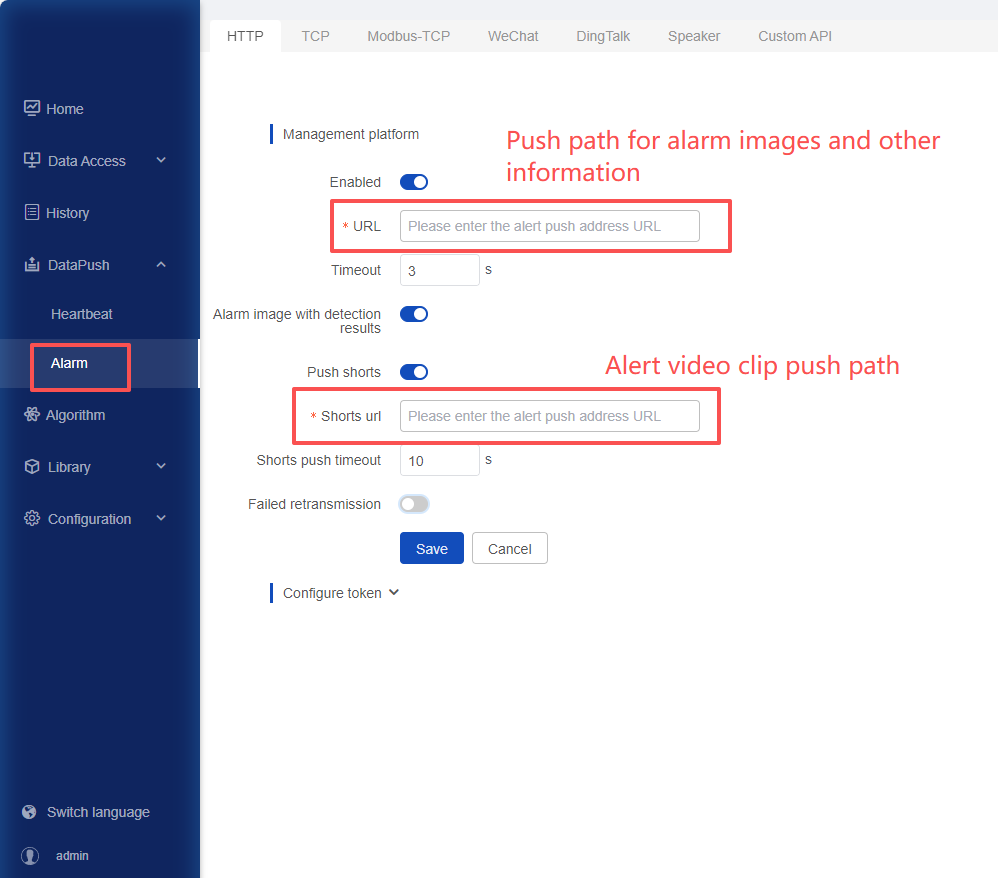
Fill in the target address for sending alarms on the AI BOX device side
On the box device, you need to fill in the address of the alarm receiving end as follows:
- Fill in the link http://Computer IP address:Port number/alert on the corresponding page of the box device. This path is for pushing alarm images
- Fill in the link http://Computer IP address:Port number/alert/video on the corresponding page of the box device. This path is for pushing alarm video clips (Only the 8/16-box of KS968 device and KS988 device have the function of alarm video clips, other models do not have this function)
Download Address
- Link: https://pan.baidu.com/s/1ChqTwJHp0ki4wiAmcWlCHQ?pwd=0000
- Extraction Code: 0000
回复