
Introduction: How to open a port? Taking the opening of a port on an Alibaba Cloud server as an example, the port of an ECS (Elastic Compute Service) cloud server is opened in the security group, and the port of a lightweight application server is opened in the firewall. The following uses port 80 as an example to provide a detailed graphic tutorial on opening ports on an Alibaba Cloud server.
Alibaba Cloud purchase link
Alibaba Cloud purchase link:https://www.aliyun.com/minisite/goods?userCode=9zltmwvs
Tutorial on Opening Ports for Cloud Server ECS
The port settings for Alibaba Cloud ECS servers are configured in the security group, and the detailed tutorial is as follows:
1、Log in to the ECS Cloud Server Management Console
2、In the left sidebar, find [Instances and Images] - [Instances], locate the target ECS instance, and click the instance ID to enter the instance details page.
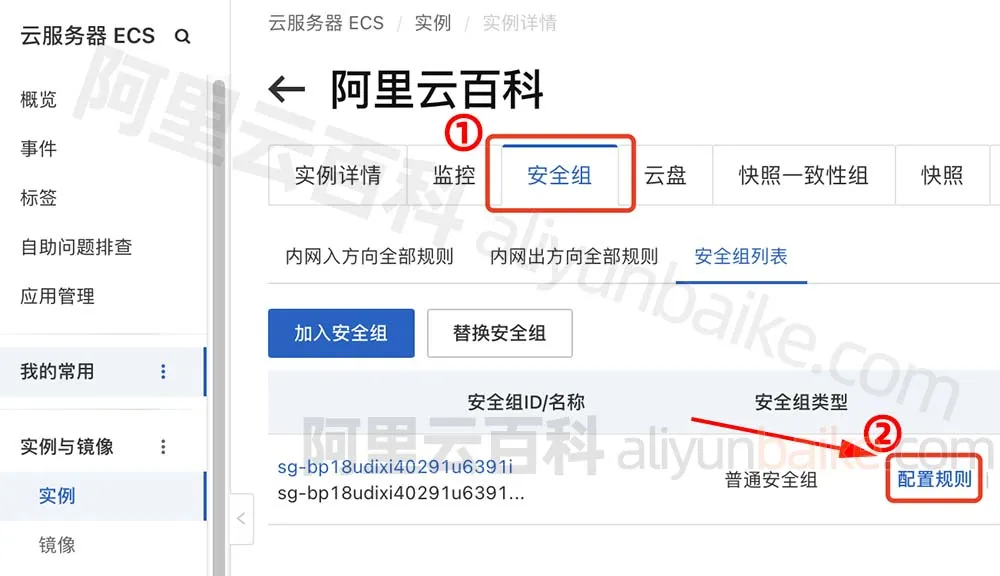
3、Switch to the [Security Group] page, click [Configure Rules] on the right side, as shown in the following figure:
4、Click [Manual Add] in the inbound direction, select [HTTP(80)] for the port range, and select [0.0.0.0/0] for the authorized object, as shown in the following figure:
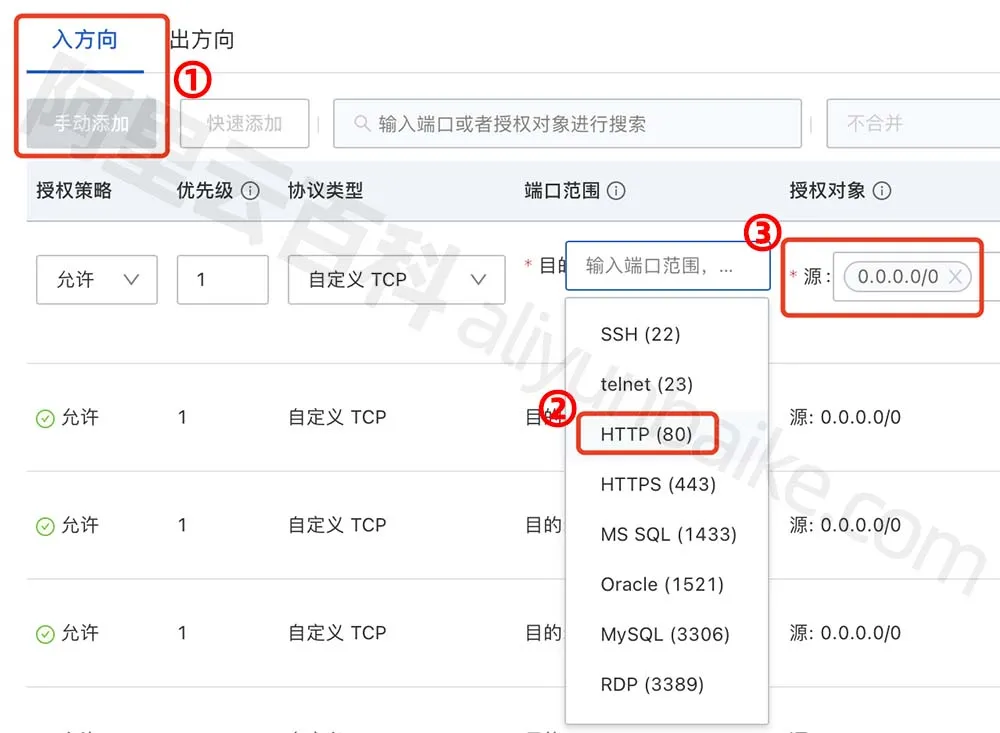
| Field | Explanation |
|---|---|
| Authorization Policy | allow |
| Priority | 1 |
| Protocol Type | Custom TCP |
| Port range Purpose | HTTP(80), the system has preset port numbers such as 22, 23, and 80. You can select 80, or manually enter 80. |
| Authorized Object Source | 0.0.0.0/0, represents all IPv4 addresses, meaning that port 80 is opened for use by all IPv4 addresses |
| Description | Just fill it in casually; you just need to know it yourself. |
Then click [Save], and there is no need to restart the cloud server. The security group rules will take effect immediately after being saved. At this point, port 80 of the ECS cloud server has been opened.
回复